Camera
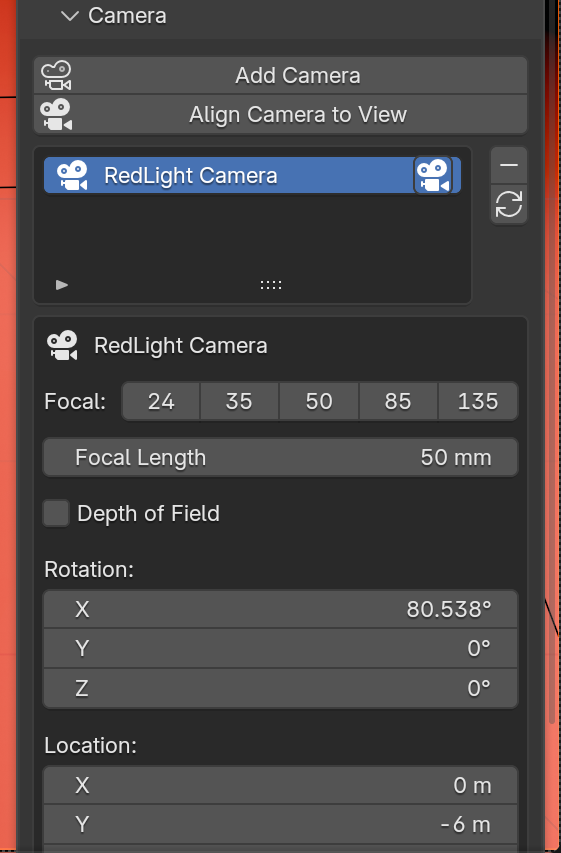
| Button | What it does |
|---|---|
| Add Camera | Adds a camera aimed at the rig and makes it the scene camera. |
| Align Camera to View | Moves the selected camera to match the current viewport view. |
The camera list
Every RedLight camera on the rig. Click a row to edit that camera. The camera icon on a row makes it the scene's active (render) camera.
| Button | What it does |
|---|---|
| Minus | Removes the selected camera. |
| Refresh | Rebuilds the list. |
Editing a camera
| Control | What it does |
|---|---|
| Focal buttons | One-click 24, 35, 50, 85 or 135 mm. |
| Focal Length | Any focal length. |
| Depth of Field | Turns depth of field on. |
| F-Stop, Blades, Rotation, Ratio | The aperture settings. |
| Focus | The object to focus on. The eyedropper sets it to the active object. |
| Focus Distance | Used when no focus object is set. |
| Rotation, Location | The camera's transform. |
Cameras do not follow Rig Transform, so turning the rig changes the lighting without moving your framing.